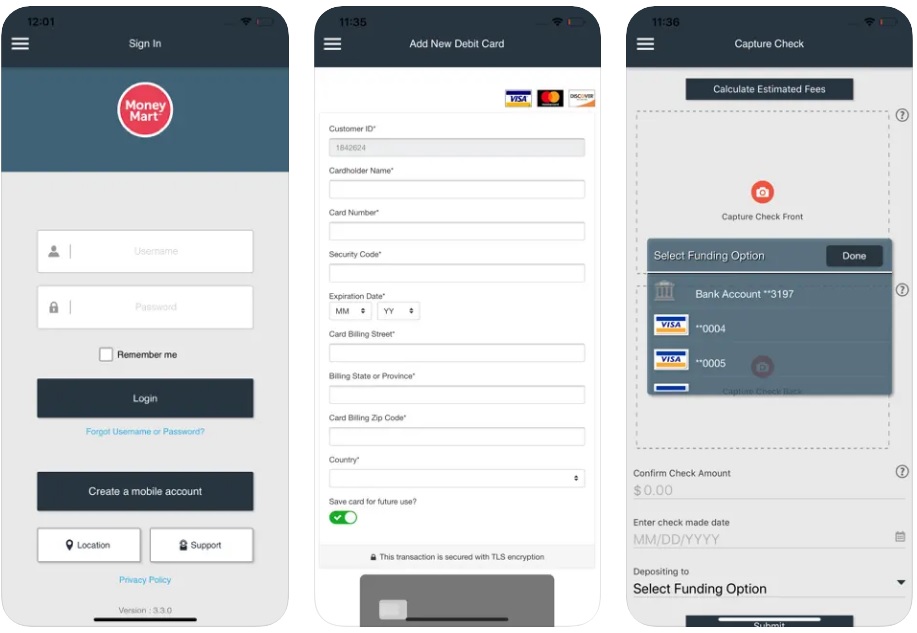
Money Mart is a financial services company that provides payday loans, installment loans, and other financial products to consumers in Canada and the United States. Money Mart also offers a mobile app that allows customers to manage their loans and finances on the go. The Money Mart USA Mobile app allows users to apply for loans, make payments, view their loan history, and access a variety of other features related to their Money Mart account. Users can also set up automatic payments, receive notifications about their loan status, and contact customer support through the app.
Loan Management. Customers can view their loan history, make payments, and track their loan status.
Account Management. Users can view their debit card account balance, update their contact information, and manage their profile settings.
Automatic Payments. The app enables customers to set up automatic payments to ensure timely repayment of their loans.
Mobile Check Deposit. The app allows users to deposit checks directly to their bank account or their Momentum® Prepaid MasterCard® or to any of their personal Visa, MasterCard, Discover or prepaid DEBIT card using the smartphone or tablet.
How to Download the Money Mart App?
For iOS
Open the App Store. Unlock your iOS device and find the App Store icon. Tap on it to open the App Store.
Search for "Money Mart". In the search bar at the bottom of the screen, type "Money Mart" and tap the search button.
Select the Money Mart App. From the search results, find the Money Mart app. It should have the Money Mart logo. Tap on the app to view its details.
Download the App. Tap the "Get" button next to the Money Mart app. You may be prompted to enter your Apple ID password or use Face ID/Touch ID to confirm the download.
Open the App. Once the app has been downloaded and installed, tap "Open" to launch the Money Mart app. You can also find it on your home screen.
For Android
Open Google Play Store. Unlock your Android device and find the Google Play Store icon. Tap on it to open the Play Store.
Search for "Money Mart". In the search bar at the top of the screen, type "Money Mart" and tap the search button.
Select the Money Mart App. From the search results, locate the Money Mart app. It should display the Money Mart logo. Tap on the app to view more details.
Install the App. Tap the "Install" button. The app will begin downloading. You may need to grant permission or accept terms and conditions before the installation begins.
Open the App. After the app has been downloaded and installed, tap "Open" to launch the Money Mart app. You can also find it in your app drawer.
How to Apply in the Money Mart App?
You cannot apply for a loan directly through the Money Mart app. To apply for a loan, you need to visit the Money Mart website and complete the application process there.
How to Make Payments Through the Money Mart App?
Currently, you cannot repay loans directly through the Money Mart app. The app only allows you to deposit checks. To repay your loan, you'll need to use the Money Mart website or visit a store location.
How to Delete the Money Mart App?
For iOS
Locate the Money Mart App. Find the Money Mart app on your home screen.
Tap and Hold the App Icon. Press and hold the Money Mart app icon until all the app icons start to jiggle.
Tap the "Remove App" Option. A small menu will appear above the app icon. Tap "Remove App."
Confirm Deletion. Tap "Delete App" in the confirmation prompt that appears.
Finalize the Deletion. Confirm the deletion once more if prompted. The app will be removed from your device.
For Android
Locate the Money Mart App. Find the Money Mart app icon on your home screen or in the app drawer.
Tap and Hold the App Icon. Press and hold the Money Mart app icon until a menu appears or the icon starts to move.
Drag the App to the Uninstall Area. Drag the app icon to the "Uninstall" option that appears at the top or bottom of the screen.
Confirm Uninstallation. A confirmation prompt will appear. Tap "OK" or "Uninstall" to confirm.
Finalize the Uninstallation. The app will be removed from your device.
There are several reasons why you may not be able to access your Money Mart USA Mobile app. Here are a few common issues and their potential solutions:
You may be entering incorrect login credentials. Double-check your username and password to ensure that they are correct. If you have forgotten your password, you can reset it using the "Forgot Password" option on the app's login screen.
The Money Mart USA Mobile app may be experiencing technical issues. Try closing the app and reopening it, or uninstalling and reinstalling the app to see if that resolves the issue.
Your account may be locked or suspended. This could happen if you have missed loan payments or violated the terms of your loan agreement. Contact Money Mart customer support to inquire about the status of your account and to resolve any issues.
There may be an issue with your device or internet connection. Ensure that your device is connected to a stable internet connection and that there are no software or hardware issues that could be affecting app performance.
If you have tried these solutions and are still unable to access your Money Mart USA Mobile app, contact Money Mart customer support for further assistance.
Can I repay my Money Mart loan through the app?
No, you cannot repay your loan through the Money Mart app. The app only allows you to deposit checks.
How do I deposit a check using the Money Mart app?
To deposit a check, open the Money Mart app, select the deposit option, follow the prompts to take a picture of the front and back of the check, and then submit it for processing.