Lower is an online mortgage lender with offices in New Albany, Ohio, and Columbia, Maryland. The company was founded in 2018 with the goal of simplifying the mortgage process and making it more accessible to consumers.
Lower offers a range of mortgage products, including conventional loans, FHA loans, VA loans, and jumbo loans. The company's online platform allows borrowers to apply for a mortgage, submit documentation, and track the progress of their loan application from start to finish.
Lower app is a mobile application developed by Lower, a digital mortgage lender based in Ohio, USA. The app is designed to help users navigate the home-buying process and manage their mortgages entirely online.
The Lower Mobile app offers a range of features, including goal tracking, credit monitoring, savings accounts for down payments, and mortgage management tools. With the app, users can set savings goals, monitor their credit scores, and apply for mortgages, all from their mobile devices.
Mobile App Features
Lower Mobile app is designed to help you achieve your dream of owning a home. With a few simple steps, you can set your goal, save for a down payment, get expert advice, check your credit, and purchase your dream home.
Here are some of the features of the Lower app:
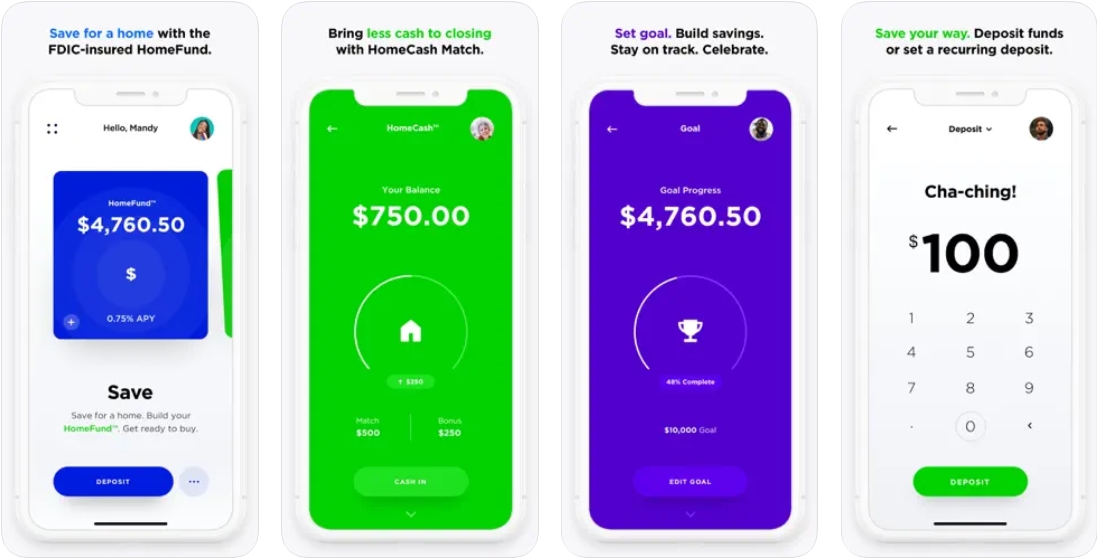
FDIC-insured Savings. Lower app offers HomeFund™, a savings account specifically designed for the home savings. With HomeFund™, customers can earn HomeCash on each deposit while building long-term interest. This way, customers can save for their home faster.
Homecash™ Match. For every dollar customers deposit into their HomeFund™ account, Lower app will match them with a dollar in HomeCash™. They can use HomeCash™ toward the purchase of their home.
Goal Tracking. With Lower app, users can set their savings goal, get reminders, and track their progress. They will be able to celebrate milestones and see their savings grow. Lower app will help customers achieve their dream of homeownership.
Home Financing. Customers can keep an eye on mortgage rates in the app while their HomeFund grows. Once they've met their savings goal, they can contact a loan advisor with just one tap and explore home financing options.
Credit Monitoring. Lower app helps users get their credit score in shape. They can keep tabs on their score in the app and get credit-ready while they save.
With these features, Lower Mobile app makes the process of becoming a homeowner easier and more accessible.
How to Download
To download the Lower Mobile app, follow these steps:
Open the app store on your mobile device. If you have an iPhone, open the App Store. If you have an Android device, open the Google Play Store.
In the search bar at the top of the screen, type "Lower" and tap search.
The Lower app should appear in the search results. Tap the "Install" or "Get" button next to the app to begin the download process.
Depending on your device, you may be prompted to enter your password or use your fingerprint to confirm the download.
Once the app has finished downloading, tap the "Open" button to launch the app.
If you're a first-time user, you'll need to create an account with Lower. Follow the prompts to set up your account, including entering your personal and financial information.
Once you've set up your account, you can start using the app to set your savings goal, save for a down payment, check your credit, and explore home financing options.
How to Apply in the App
To apply for a mortgage through the Lower Mobile app, follow these steps:
Open the Lower app on your mobile device and log in to your account.
Tap the "Apply Now" button on the home screen or navigate to the "Home Financing" section of the app.
Follow the prompts to enter your personal and financial information, including your income, employment history, and credit score. You may also need to provide documentation such as pay stubs, tax returns, and bank statements.
Once you've completed the application, you'll be connected with a loan officer who will review your information and provide you with a loan estimate.
If you decide to move forward with the loan, you'll need to provide additional documentation and complete any necessary steps in the application process.
Throughout the process, you can use the Lower app to track the progress of your application and communicate with your loan officer.
Once your application is approved and your loan is funded, you can use the Lower app to manage your mortgage payments and track your home equity.
If you have any issues applying for a mortgage through the Lower Mobile app, you can contact their customer support team for assistance.
How to Make Payments Through the App?
To make mortgage payments through the Lower Mobile app, follow these steps:
Open the Lower app on your mobile device and log in to your account.
Tap the "Payments" button on the home screen or navigate to the "Manage Mortgage" section of the app.
Select the option to make a payment and choose your preferred payment method, such as a bank transfer or credit card.
Follow the prompts to enter the payment amount, payment date, and any necessary payment details.
Review the payment information and confirm the payment.
Once the payment has been processed, you'll receive a confirmation in the app and via email.
You can use the Lower app to track your mortgage payments, view your payment history, and set up automatic payments for future months.
If you have any issues making payments through the Lower Mobile app, you can contact their customer support team for assistance.
How to Delete an App?
To delete the Lower Mobile app from your device, follow these steps:
Find the Lower app icon on your home screen or app drawer.
Press and hold the app icon until a menu appears.
Select the "Uninstall" or "Delete" option from the menu.
If prompted, confirm that you want to uninstall the app.
Wait for the app to be removed from your device. The time it takes to uninstall will depend on your device's speed and the size of the app.
Once the app has been uninstalled, you may also want to delete any associated files or data, such as saved login information or user preferences. This can typically be done by going to your device's settings, selecting "Apps & Notifications," and finding the Lower app in the list of installed apps.
FAQ
Why can't I access my Lower Mobile app?
There could be several reasons why you may be unable to access the Lower Mobile app. Here are some common issues and their potential solutions:
Incorrect login credentials. If you are unable to access the app, double-check that you are using the correct login credentials. If you've forgotten your password, you can use the "Forgot Password" feature to reset it.
App maintenance or downtime. Occasionally, the app may be undergoing maintenance or experiencing downtime. Check the Lower website or social media channels to see if there are any known issues.
Internet connectivity issues: Make sure that your device is connected to the internet and that your internet connection is strong and stable. Try resetting your internet connection or connecting to a different network.
Outdated app version. If you are using an outdated version of the app, it may not be compatible with your device or may have security vulnerabilities. Try updating the app to the latest version available in your app store.
Device compatibility issues. The Lower app may not be compatible with all devices or operating systems. Check the app's system requirements to ensure that your device is compatible.
If you continue to have issues accessing the Lower Mobile app, you can contact their customer support team for assistance.