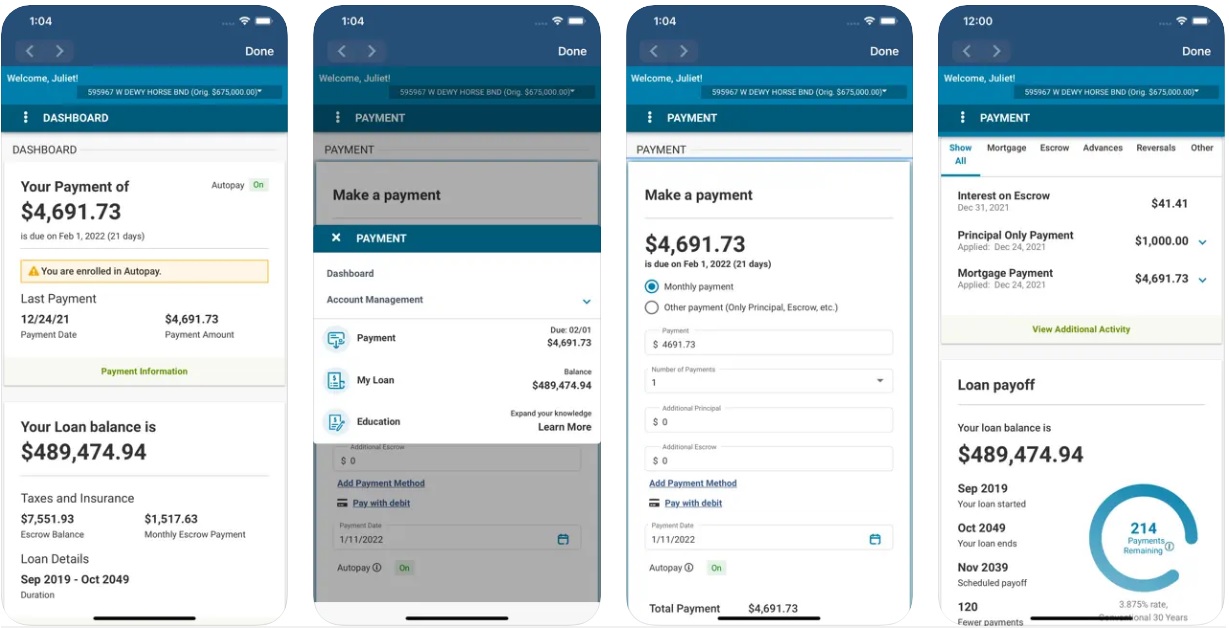
Caliber Home Loans provides a mobile app that allows customers to manage their home loan account, make payments, view transaction history, and access customer support. The app is available for download on both iOS and Android platforms.
The app provides customers with a convenient way to stay on top of their mortgage payments and keep track of their account information. Customers can also use the app to contact customer service representatives and receive assistance with any questions or concerns they may have about their home loan.
Mobile App Features
The Caliber Home Loans Mobile app offers several features to its users, including:
Home Value Explorer. This feature allows customers to access estimated home values for properties in their area, which can help them stay informed about changes in the real estate market.
Mortgage payments. Customers can make mortgage payments or set up recurring monthly payments that are automatically deducted from their bank account. This feature is designed to make it easier for customers to stay current on their mortgage payments and avoid late fees or missed payments.
Mortgage Calculator. Customers can use this tool to calculate their monthly mortgage payments, estimate closing costs, and determine how much they can afford to borrow.
Rate Tracker. This feature allows users to monitor current mortgage rates and receive alerts when rates change.
Refinance Center. If customers are interested in refinancing their existing mortgage, the Caliber Home Loans app provides a variety of resources and tools to help them explore their options.
My Loan Consultant. The app offers a convenient way for customers to search for loan consultants, view their information, and contact them through email, phone, or SMS with just a few taps.
Document Center. The app provides a secure platform for users to upload, view, and sign important loan documents, making it easy to manage their paperwork from anywhere.
eStatements. This feature allows customers to access their mortgage statements electronically, without having to wait for a paper statement to arrive in the mail.
Escrow Account Management. If customers have an escrow account set up to pay property taxes and/or homeowner's insurance, they can use the app to view their account balance and make changes to their payment preferences.
By using the Caliber Home Loans Mobile app, customers can take charge of their mortgage and stay informed about their loan status at all times. The app's user-friendly interface makes it easy to navigate and access important information about your loan, while its secure platform ensures that your personal and financial information remains protected.
How to Download
To download the Caliber Home Loans Mobile app, follow these steps:
Open the App Store or Google Play Store on your mobile device.
Search for "Caliber Home Loans" in the search bar.
Once you locate the Caliber Home Loans Mobile app, select "Download" or "Install."
Wait for the app to download and install on your device.
Once the app is installed, open it and log in using your Caliber Home Loans account credentials.
If you don't have a Caliber Home Loans account, you can create one directly from the app by selecting "Create an Account" and following the prompts. Once you've logged in or created an account, you can start using the app to manage your mortgage account and access its features.
How to Apply in the App
To apply for a home loan through the Caliber Home Loans Mobile app, follow these steps:
Open the app and select "Apply for a Home Loan" from the home screen.
Choose the type of home loan you're interested in, such as a purchase loan, refinance loan, or construction loan.
Fill out the loan application form with your personal and financial information, including your income, employment history, and credit score.
Upload any required documentation, such as tax returns, pay stubs, and bank statements.
Review and submit your application.
Once you submit your application, a loan consultant from Caliber Home Loans will contact you to discuss your options and guide you through the rest of the loan process. You can also use the app to track the status of your application and communicate with your loan consultant. Applying for a home loan through the Caliber Home Loans app is a convenient and streamlined process that allows you to manage your application from anywhere.
How to Make Payments Through the App?
To make a payment through the Caliber Home Loans Mobile app, follow these steps:
Open the app and log in to your account.
Select "Make a Payment" from the home screen.
Choose the payment amount and payment date. You can make a one-time payment or set up recurring monthly payments.
Select the payment method. You can make a payment using your bank account or debit card.
Enter your payment information, such as your account number and routing number or your debit card information.
Review and submit your payment.
Once your payment is submitted, you will receive a confirmation of your payment and your account balance will be updated. You can also view your payment history and upcoming payment due dates through the app. Making payments through the Caliber Home Loans Mobile app is a convenient and secure way to manage your mortgage account from anywhere.
How to Delete an App?
To delete the Caliber Home Loans Mobile app from your mobile device, follow these steps:
Locate the app icon on your device's home screen or app drawer.
Press and hold the app icon until a menu appears.
Select "Uninstall" or "Remove" from the menu.
Confirm that you want to uninstall the app when prompted.
Alternatively, you can uninstall the app from your device's app settings. To do this:
Open your device's settings.
Select "Apps" or "App Management" from the menu.
Find the Caliber Home Loans app in the list of installed apps.
Select the app and then select "Uninstall" or "Remove."
Confirm that you want to uninstall the app when prompted.
Keep in mind that uninstalling the app will remove it from your device, but it will not close your Caliber Home Loans account. If you want to close your account, you will need to contact Caliber Home Loans customer support directly.
FAQ
Why can't I access my Caliber Home Loans Mobile app?
There could be several reasons why you may not be able to access your Caliber Home Loans Mobile app. Here are some common issues and their solutions:
Incorrect login credentials. If you are unable to access your account, make sure you are entering the correct login credentials. Check your email for any verification links and make sure you have verified your account.
App update required. If you are having trouble accessing the app, it may be because you need to update it. Check for any available updates in the App Store or Google Play Store and install them.
Server issues. Caliber Home Loans may experience server issues from time to time, which can prevent you from accessing the app. If this is the case, you can try again later or contact customer support for assistance.
Network connectivity issues. If you have poor network connectivity or are experiencing connectivity issues, you may not be able to access the app. Try connecting to a different network or resetting your device's network settings.
Account issues. If there are any issues with your Caliber Home Loans account, such as missed payments or outstanding balances, you may be unable to access the app. Contact customer support to resolve any account issues.
If none of these solutions work, you can contact Caliber Home Loans customer support for further assistance.